파이썬 국문 자습서 웹 크롤링하여 PDF 파일로 변환하기
1. 크롤링하려는 웹페이지와 웹페이지의 구조
2. 주석을 포함한 크롤링 코드
3. 추가 주의 사항
1. 크롤링하려는 웹페이지와 웹페이지의 구조
파이썬 국문 자습서 : https://docs.python.org/ko/3.13/tutorial/index.html 를 크롤링하려고 합니다.
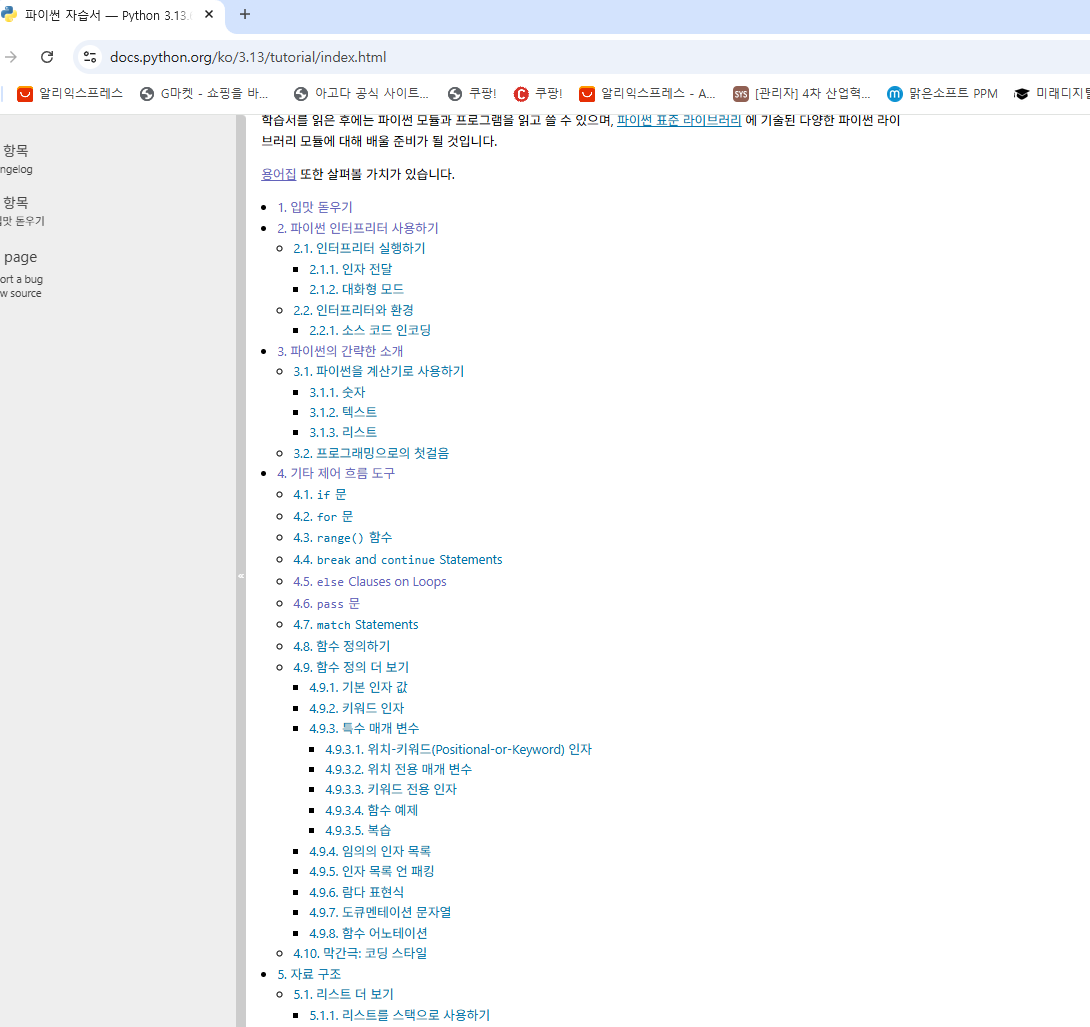
이런식으로 1. 입맛 돋우기 2.파이썬 인터프리터 사용하기 3.파이썬의 간략한 소개 등으로 링크를 타고 들어가 문서를 열고 크롤링해서 pdf한권으로 이어줄 예정입니다.
1. 입맛 돋우기 : https://docs.python.org/ko/3.13/tutorial/appetite.html
2. 파이썬 인터프리터 사용하기 : https://docs.python.org/ko/3.13/tutorial/interpreter.html
....
이런 형태로 링크가 생성되어있습니다.
첫 index 페이지에서 1.입맛 돋우기, 2.파이썬 인터프리터 사용하기 등의 class는
div.toctree-wrapper.compound a.reference.internal
입니다. for문을 돌면서 링크들을 가져와야 겠죠.
2.1인터 프리터 실행하기 , 2.1.1 인자 전달 등도 이 클래스에 포함되어 있어서 필요한 링크만 뽑기 위해서는 정규식을 활용하여
"1. ", "2. ", "10. "처럼 "숫자 + 마침표 + 공백"으로 시작하는 문자열만 매칭하여 뽑아줘야 합니다.

각각의 페이지에 본문 부분은 role="main"입니다.

2. 주석을 포함한 크롤링 코드
주석을 포함한 크롤링 코드를 공개 합니다.
import requests # 웹 페이지 데이터를 가져오기 위한 라이브러리
from bs4 import BeautifulSoup # HTML 문서에서 원하는 데이터를 추출하기 위한 라이브러리
from weasyprint import HTML # HTML을 PDF로 변환하기 위한 라이브러리
from urllib.parse import urljoin # 상대 경로를 절대 경로로 변환하기 위한 라이브러리
import re # 정규표현식으로 문자열을 처리하기 위한 라이브러리
#기본 url설정
index_url = urljoin(base_url, "index.html")
# 1. index 페이지에서 '1.', '2.', ..., '16.'으로 시작하는 항목만 추출
res = requests.get(index_url)
soup = BeautifulSoup(res.text, "html.parser") # 가져온 HTML 문서를 파싱해 Python에서 다룰 수 있는 객체로 변환
main_links=[] #1. 입맛 돋우기 2.파이썬 인터프리터 사용하기... 등의 링크들을 담기 위한 리스트 생성
for a in soup.select("div.toctree-wrapper.compound a.reference.internal"):
text = a.get_text(strip=True)
#1. ", "2. ", "10. "처럼 "숫자 + 마침표 + 공백"으로 시작하는 문자열만 매칭하여 뽑기
if re.match(r"^\d+\. ", text):
main_links.append(urljoin(base_url, a['href'])) #main_links리스트에 <a>태그 안에 있는 href 속성 값을 가져와 넣기
#pdf 파일로 만들기 전에 우선 html로 만들기
full_html=""
for url in main_links:
page = requests.get(url)
page.encoding='utf-8'
doc = BeautifulSoup(page.text, "html.parser")
main = doc.find("div", {"role": "main"}) #본문 부분을 찾아서 main에 넣음
if main :
h1 = main.find("h1") #본문에서 제목을 찾아서
if h1: #제목이 있다면
title = h1.get_text() #제목을 추출하여 title에 넣어두고
h1.extract() #h1자체 내용은 지워라 (출력된 문서에 제목이 중복되어 나오지 않기 위함)
else:
""
full_html += f"<h1>{title}</h1>\n" #full_html에 제목을 더하고
full_html += str(main) #제목이 제거된 본문 텍스트를 더해라
#스타일을 지정해 준 마지막으로 출력되는 html
final_html = f"""
<!DOCTYPE html>
<html lang="ko">
<head>
<meta charset="UTF-8">
<style>
body {{
font-family: 'Nanum Gothic', sans-serif;
line-height: 1.7;
font-size: 16px;
}}
h1 {{
page-break-before: always;
color: darkblue;
}}
code {{
background: #f4f4f4;
padding: 2px 4px;
border-radius: 4px;
}}
pre, .highlight {{
background: #f0f0f0;
padding: 10px;
border-radius: 6px;
font-family: 'Courier New', monospace;
font-size: 90%;
overflow: auto;
}}
a {{
color: black;
text-decoration: none;
}}
</style>
</head>
<body>
{full_html}
</body>
</html>
"""
#weasyprint를 활용하여 pdf로 변환
HTML(string=final_html, base_url=base_url).write_pdf("python_ko_book.pdf")
print("완성! python_ko_book.pdf 로 저장되었습니다.")
3. 추가 주의 사항
1. weasyprint를 활용하려면 GTK runtime을 다운받은 후 pip install weasyprint로 설치해야한다.
윈도우용 GTK runtime donwload 사이트
https://sourceforge.net/projects/gtk-win/
GTK+2 for Windows Runtime Environment
Download GTK+2 for Windows Runtime Environment for free. The files required to run GTK+ applications on Windows. This is the GTK+2 Runtime Environment Installer for Windows. It includes all of the files required to run GTK+2 applications on Windows.
sourceforge.net
2. 크롤링 하는 언어가 한국어 이므로
코드에
<!DOCTYPE html>
<html lang="ko">
<head>
<meta charset="UTF-8">
설정을 해주어야 합니다.